Getting Started With Multi-Pattern String Matching in Python
Tags: Python,
String Matching, DLP,
Aho Corasick
Searching for words or patterns in text is
everywhere, from search engine to security tools
hunting for sensitive data, to you searching in
webpage or files with Ctrl + F.
When the search space is small, the approach used almost does not matter. Now, imagine the search space is large i.e. large documents or multiple patterns at once, then a single search scan can take minutes or even hours depending on the approach used. The choice of faster and better algorithm start to matter.
In this post we explore string matching algorithms, starting simple and building to the Aho-Corasick algorithm.
Method 1: The Naive Approach - Loop
The most simplest way to search for multiple
patterns is to loop over each keyword and check
whether it exists in the text. In Python, we can use
in operator or str.find().
We scan the text from left to right until it reaches
the end.
def naive_search(text, keywords):
    matches = []
    for keyword in keywords:
        if keyword in text:
            start = text.find(keyword)
            matches.append((keyword, start))
    return matches
The Pros: Simplicity,
Fast enough for short texts and small keyword
                                lists
The Problem:
Worst Time Complexity: O(n*m)
As your keyword list grows to thousands of entries, the method slows down significantly. Because for every keyword, you have to re-scan the entire document from start to finish.
Method 2: Regex with Alternation
A common improvement is to combine all keywords into a single regular expression using alternation (|). This allows the regex engine to scan the text in one pass.
import re
def regex_search(text, keywords):
    pattern = '|'.join(re.escape(kw) for kw in keywords)
    regex = re.compile(pattern)
    return [(m.group(), m.start()) for m in regex.finditer(text)]
The Pros: Single pass over text,
Often faster than naive loops,
Uses Python’s optimized regex engine
The Problem:
Complex regex becomes hard to maintain,
Performance degrades with many patterns
While this method works well for moderate keyword sets, it becomes fragile and inefficient when patterns number in the thousands.
Method 3: Aho-Corasick Algorithm
The Aho–Corasick algorithm, introduced by Alfred V. Aho and Margaret J. Corasick in 1975, is designed specifically for multi-pattern string matching. Unlike previous approaches, it matches all keywords simultaneously in a single pass.
How it works:
- Build a trie
All keywords are inserted into a trie (prefix tree), where each edge represents a character and terminal nodes mark complete words.
- Add failure links
Similar to the KMP algorithm, failure links allow the automaton to jump to the longest valid suffix when a mismatch occurs.
- Add output links
These links make it possible to report multiple matches efficiently when one keyword is a suffix of another.
- Scan the text
The text is processed character by character while traversing the automaton. Matches are emitted instantly when reached.
Time Complexity: Scanning takes
O(n + m) time (n = text length, m =
matches)
This performance is independent of the number of
keywords.
import ahocorasick

def aho_corasick_search(text, keywords):
    A = ahocorasick.Automaton()

    for idx, keyword in enumerate(keywords):
        A.add_word(keyword.lower(), keyword)
    A.make_automaton()

    matches = []
    for end_index, keyword in A.iter(text.lower()):
        start_index = end_index - len(keyword) + 1
        matches.append((keyword, start_index))
    return matches
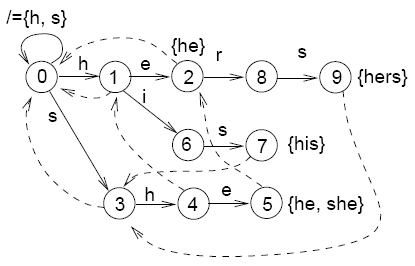
An Aho-Corasick automaton. Failed transitions are dashed. Omitted transitions lead to the root of the trie. source
The Pros:
Extremely fast for large keywords sets,
Single pass over the text,
low memory consumptions
Real-world use: Virus scanners,
Data Loss Prevention (DLP),
search engines,
DNA pattern search
Final Thoughts
If you’re searching for just a handful of keywords, simple methods are often enough. But as soon as scale enters the picture — large documents, massive keyword lists, or real-time scanning — specialized algorithms like Aho–Corasick become helpful.